
SSR 환경에서 OS 테마 대응하기
다크모드만 애용하는 제게 라이트모드는 가끔 궁금할 때 빼고는 거의 보지 않는 모드와 같아요. (ㅎㅎ) 개인 블로그를 구현하는 와중 Default 모드가 라이트 모드이기 때문에 새로고침 할 때마다 밝은 화면을 마주하는 게 눈의 피로도를 높이는 문제점을 발견했어요.
이런 문제는 저에게만 해당된다고 생각하지 않기 때문에
"디바이스 모드에 대응되는 값을 Default 모드로 할 수는 없을까?"
라는 생각이 들었고, 이미 제가 사용하는 웹 사이트들 중 대부분은 이렇게 구현되고 있음을 확인했어요.
따라서 저 또한 디바이스에 대응되는 테마 동기화!를 구현해보고자 합니다.
처음 작성한 코드는 이와 같아요.
useEffect(() => {
  if (typeof window !== 'undefined') {
    const isLight = window.matchMedia('(prefers-color-scheme: light)').matches;
    setTheme(isLight ? Theme.LIGHT : Theme.DARK);
  }
}, []);
window의 matchMedia 메서드를 통해 theme이 light인지 판별하고, 이에 해당하는 Theme을 설정해주는 로직이에요.
어찌보면 당연한 문제가 발생했어요.
제가 구현한 기술블로그는 Remix를 사용했기 때문에 SSR 환경이었고, 때문에 클라이언트 측 코드는 html이 모두 빌드된 이후 실행되어 아래 영상과 같이 새로고침을 통해야만 시스템에 대응하는 모드를 가지는 걸 확인할 수 있었어요.
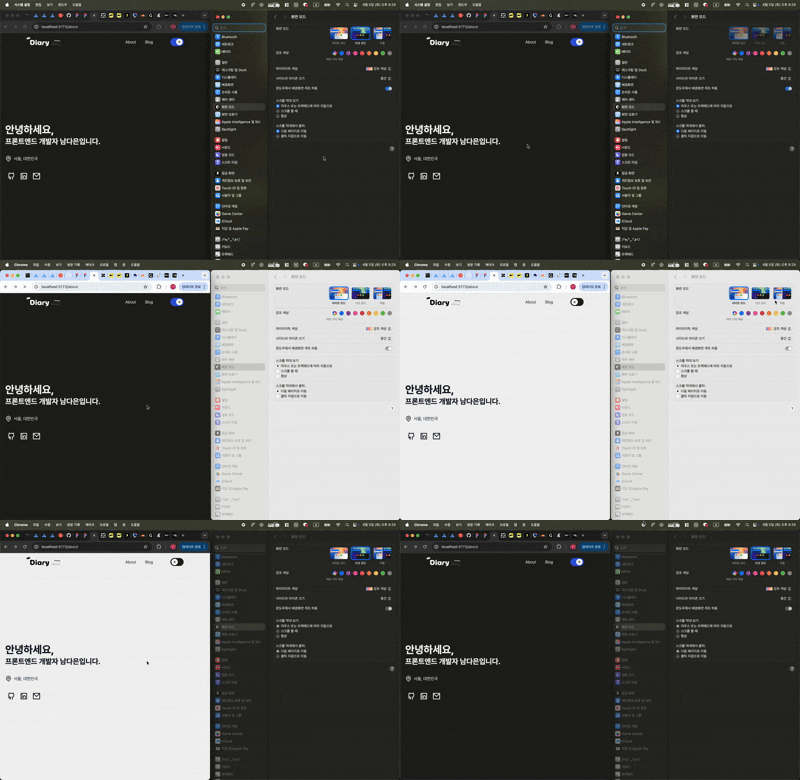
이런 흐름은 자연스럽지 못한 액션이라고 생각하여 시스템 환경과 사이트 테마를 유동적으로 대응할 수 있도록 수정하고자 해요.
1. 패키지 설치
Remix에서는 @remix-run/node 패키지를 통해 쿠키 관련 기능을 기본으로 제공해요.
쿠키를 만들어서 서버에서 theme과 관련된 값을 관리해요.
pnpm add @remix-run/node remix-themes
2. 서버에서 theme에 대한 정보 가져오기
theme.server.ts
import { createCookieSessionStorage } from '@remix-run/node';
import { createThemeSessionResolver } from 'remix-themes';

const sessionStorage = createCookieSessionStorage({
  cookie: {
    name: 'theme',
    path: '/',
    httpOnly: true,
    sameSite: 'lax',
  },
});

export const themeSessionResolver = createThemeSessionResolver(sessionStorage);
3. 서버 측에서 테마 전달하기 → SSR 대응
Remix의 loader 함수에서 쿠키를 통해 전달받은 theme 값을 초기 HTML 렌더링 시점에 전달해줄 수 있어야 해요.
root.tsx
export const loader = async ({ request }: LoaderFunctionArgs) => {
  const { getTheme } = await themeSessionResolver(request);
  return json({ theme: getTheme() });
};
4. ThemeProvider를 통해 theme 전달
ThemeProvider 내의 specifiedTheme을 사용해서 서버에서 전달한 값을 넘겨줘야 해요. themeAction 경로는 사용자가 테마를 수동으로 변경할 때 호출되는 서버 액션입니다.
export default function AppWithProviders() {
  const { theme } = useLoaderData<typeof loader>();
  const isThemeSet = Boolean(theme);

  return (
    <ThemeProvider
      specifiedTheme={theme as Theme | null}
      themeAction="/actions/set-theme"
    >
      <App isThemeSet={isThemeSet} />
    </ThemeProvider>
  );
}
5. 테마 변경 액션 만들기
사용자가 라이트/다크 모드를 수동으로 선택할 경우, 디바이스 테마 이외에도 이 선택을 서버에 저장해주는 액션이 필요해요.
/actions/set-theme 라우트를 만들어 쿠키를 업데이트 해줍니다.
이 액션은 remix-themes의 ThemeProvider에서 내부적으로 호출하는 경로이기 때문에 테마를 변경하게 되면 actions/set-theme으로 POST 요청이 가게 되고, 쿠키가 갱신되어 테마가 바뀌게 됩니다.
이때 파일명을 actions.set-theme으로 해야 정상적으로 POST 요청이 가게 돼요.
routes/actions.set-theme.ts
import { createThemeAction } from 'remix-themes';
import { themeSessionResolver } from '~/utils/theme.server';

export const action = createThemeAction(themeSessionResolver);
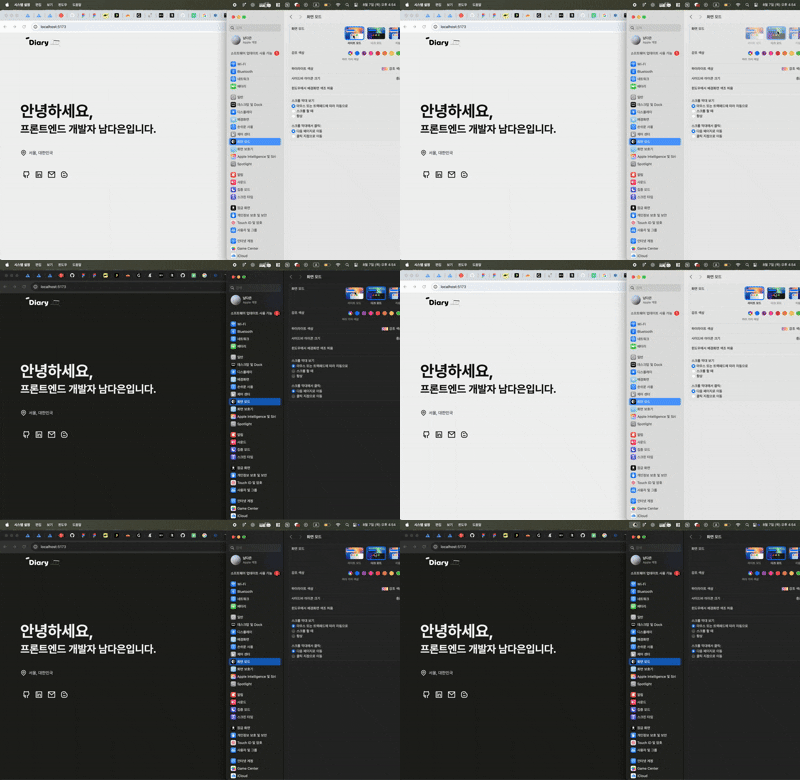
여기까지 진행하면 요렇게 새로고침 필요 없이 시스템 모드에 따라 웹 사이트의 테마도 유동적으로 바뀌는 걸 확인할 수 있어요 :) !!
FOUC(Flash of Unstyled Content) 문제
하지만 또 다른 문제 상황을 발견했어요. Cookie에 어떠한 값도 없는 경우(처음 진입했을 때)에는 기본값(ex. 라이트모드)를 띄워주는 이슈가 있었어요.
이 문제를 FOUC(Flash of Unstyled Content) 라고 부른다는 걸 알게됐어요. 서버 사이드 렌더링(SSR) 환경에서는 서버가 HTML을 먼저 생성해서 보내주게돼요. 이때 서버는 사용자의 OS 테마 설정을 직접적으로 알 수 없기 때문에, 쿠키에 저장된 테마 값이 없다면 기본값(ex. 라이트 모드)으로 HTML을 렌더링하게 돼요.
이후 클라이언트 측에서 JavaScript가 실행되면서 window.matchMedia를 통해 사용자의 실제 OS 테마를 파악하고, 이에 맞춰 테마를 변경하는 작업을 수행하게 돼요. 이 과정에서 서버가 보낸 기본 테마와 클라이언트가 적용하려는 실제 테마가 달라서 잠시 다른 테마가 보이는 현상, FOUC가 발생하게 돼요.
PreventFlashOnWrongTheme의 한계
remix-themes에서는 PreventFlashOnWrongTheme 컴포넌트를 제공해요.
<PreventFlashOnWrongTheme ssrTheme={Boolean(theme)} />
하지만 이 컴포넌트는 data-theme 속성을 설정하는 방식으로 동작해요.
vanilla-extract는 클래스 기반으로 테마를 적용하기 때문에 호환되지 않았어요.
해결: 커스텀 Blocking Script
vanilla-extract 클래스명을 직접 설정하는 blocking script를 작성했어요.
import { darkTheme, lightTheme } from '~/styles/global.css';

const getThemeScript = () => `
  (function() {
    var LIGHT = '${lightTheme}';
    var DARK = '${darkTheme}';
    var root = document.documentElement;
    var cookieMatch = document.cookie.match(/theme=(light|dark)/);
    var prefersDark = window.matchMedia('(prefers-color-scheme: dark)').matches;
    var theme = cookieMatch ? cookieMatch[1] : (prefersDark ? 'dark' : 'light');

    root.classList.remove(LIGHT, DARK);
    root.classList.add(theme === 'dark' ? DARK : LIGHT);
  })();
`;

function ThemeScript({ isThemeSet }: { isThemeSet: boolean }) {
  if (isThemeSet) return null;

  return (
    <script dangerouslySetInnerHTML={{ __html: getThemeScript() }} />
  );
}
동작 원리:
<head>에 위치한 스크립트가 body 렌더링 전에 실행- 쿠키에서 테마 확인 → 없으면
prefers-color-scheme사용 - 올바른 vanilla-extract 클래스를
<html>에 적용
테마 동기화 훅
테마 토글 시 클래스를 동기화하는 커스텀 훅도 필요해요.
function useThemeSync() {
  const [theme] = useTheme();

  useEffect(() => {
    const root = document.documentElement;
    root.classList.remove(lightTheme, darkTheme);
    root.classList.add(theme === 'dark' ? darkTheme : lightTheme);
  }, [theme]);
}
최종 App 컴포넌트
function App({ isThemeSet }: { isThemeSet: boolean }) {
  useThemeSync();

  return (
    <html lang="ko" className={lightTheme} suppressHydrationWarning>
      <head>
        <meta charSet="utf-8" />
        <meta name="viewport" content="width=device-width, initial-scale=1" />
        <Meta />
        <ThemeScript isThemeSet={isThemeSet} />
        <Links />
      </head>
      <body>
        {/* ... */}
      </body>
    </html>
  );
}
Header Switch 상태 불일치 문제
useTheme()이 초기에 null을 반환할 수 있어서 Switch UI와 실제 테마가 불일치하는 문제도 있었어요.
const getSystemTheme = (): 'light' | 'dark' =>
  typeof window !== 'undefined' &&
  window.matchMedia('(prefers-color-scheme: dark)').matches
    ? 'dark'
    : 'light';

const Header = () => {
  const [theme, setTheme] = useTheme();

  // theme이 null이면 시스템 테마 사용
  const currentTheme = theme ?? getSystemTheme();

  const handleToggle = () => {
    setTheme((currentTheme === 'light' ? 'dark' : 'light') as Theme);
  };

  return (
    <header>
      {/* ... */}
      <Switch mode={currentTheme} onChange={handleToggle} />
    </header>
  );
};
이런 과정을 통해 새로고침 없이 시스템 테마와 동기화되고, 깜빡임 없는 테마 전환이 가능한 웹사이트를 구현할 수 있게 되었어요 🎉
위 내용들은 https://dev.to/maxh1t/setting-up-themes-in-ssr-react-applications-eem 을 참고하여 작성했어요 !